
Maximizing Front AI with knowledge sources
Overview
Front’s AI features, like Copilot and Autopilot, are only as powerful as the information they can access. While AI is great at understanding language, it needs a "source of truth" to provide accurate, helpful, and brand-consistent answers.
By connecting your team’s collective knowledge to Front AI, you transform it from a general assistant into a specialized expert on your business.
Why knowledge sources matter
Accuracy and trust: Providing specific sources ensures AI isn't guessing. It uses your actual documentation to answer customer questions.
Faster resolutions: When AI has access to your help articles and past conversations, it can draft complete, ready-to-send replies, saving your team hours of manual research.
Consistency: Knowledge sources ensure that every customer receives the same high-quality information, regardless of which teammate is handling the conversation.
Transparency: When AI generates a response, it cites its sources. Your team can see exactly which article or past conversation was used to build the draft.
Knowledge source types
Front allows you to layer different types of information to create a comprehensive "knowledge layer" for your AI.
Front knowledge bases
This is your most reliable source. By using a Front knowledge base, AI can instantly access your published help articles. Updates to these articles are typically available to AI within minutes, ensuring your AI agents always use the latest information.
Learn more: Getting started with knowledge base
Public websites
If you have a public-facing help center, blog, or FAQ site hosted outside of Front, you can sync it via URL. Front will crawl and ingest up to 3,000 pages from your external site to inform its AI responses.
Learn more: Use public website content with Front AI features
Third-party sources
For companies that store specialized documentation in other platforms (like internal wikis or protected databases), third-party sources allow you to integrate that content directly into Front. This is ideal for connecting private or password-protected content that isn't accessible via a standard web crawl.
Learn more: Use third-party sources with Front AI features
File uploads
Upload PDF files directly to Front to use information from guides, onboarding materials, troubleshooting documents, and more - without connecting to an external website or application.
Each file has a 25 MB file size limit. Each workspace has a 500 MB limit across all files.
Notes
Front notes serve as a native short-form knowledge source, designed for quickly adding or supplementing information to cover gaps in other knowledge sources and power AI agents.
Learn more: Use notes with Front AI features
Adding knowledge sources
We recommend starting with a Front knowledge base for the best performance and adding external or application sources to fill in any gaps. Front knowledge bases are automatically available for use with AI agents. Follow steps below for external sources.
Step 1
Click the gear icon, navigate to your workspace settings, then select AI resources from the sidebar.
Step 2
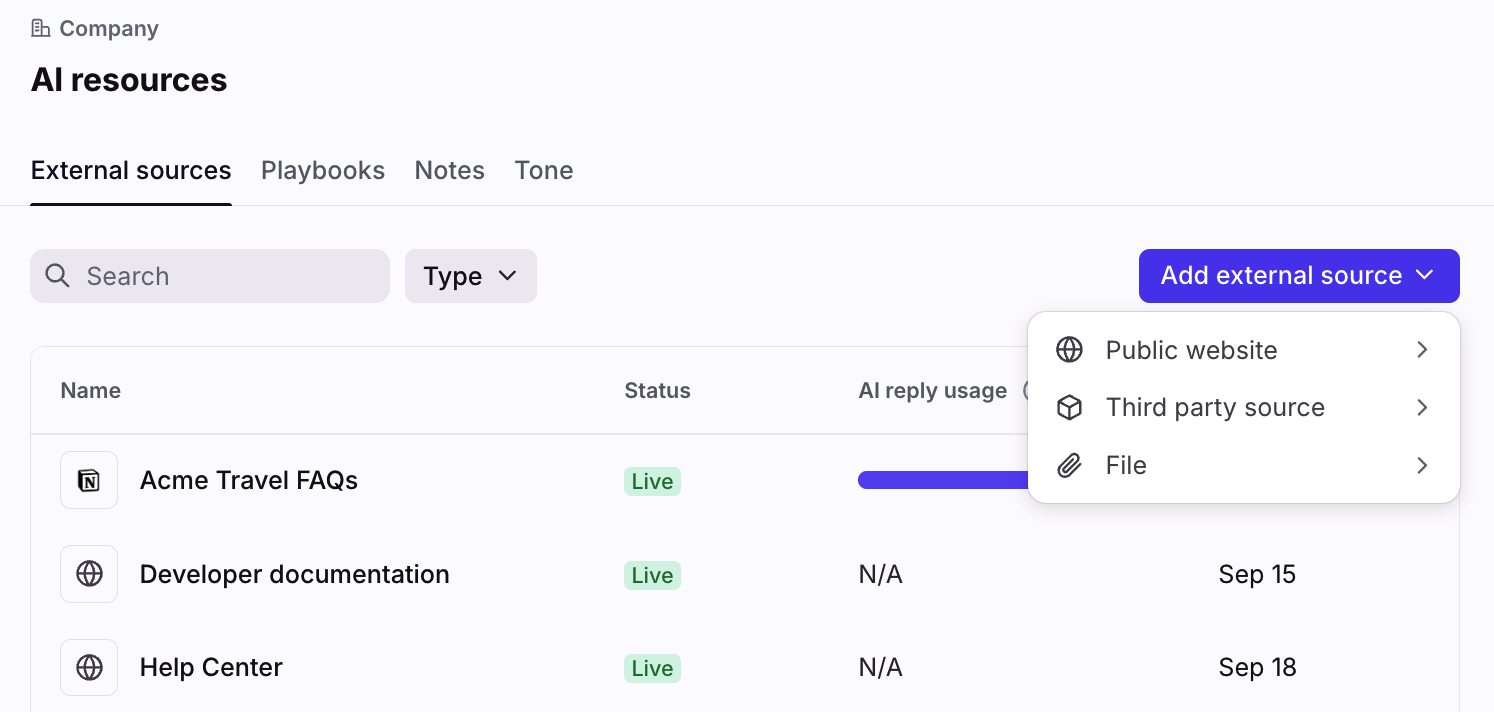
In the External sources tab, click Add external source. Select the source type you’d like to add to Front.
See these articles for more detailed instructions:
Public website: Use public website content with Front AI features
Third-party source: Use third-party sources with Front AI features
To add notes, visit the Notes tab. See this article to learn more.
Step 3
Click Save to finish.
Step 4
You can return to this list at any time to add, remove, or edit your knowledge sources.