
Building AI classification in Front
Overview
This article is a practical guide for admins who want to route, tag, and triage conversations automatically — using the right tool for each job.
Why combine deterministic rules and AI?
Not every routing decision needs AI. Some decisions are black-and-white: if the sender is no-reply@system.com, it's a system notification — no interpretation needed. Other decisions require understanding what the customer is actually asking for, which is where AI classification shines.
The best workflows use both approaches together: deterministic rules handle the obvious cases quickly, and AI steps in where human-language understanding is required. This keeps your automation fast, accurate, and reliable.
In this guide, you'll learn how to:
Decide which routing decisions should be deterministic vs. AI-powered
Write effective AI classification prompts for the "Branch with Autopilot" step
Structure your categories for reliable results
Test and iterate on your prompts
Combine everything into a complete workflow
Part 1: Choosing the right approach
Use deterministic rules when…
You have a clear, reliable signal that doesn't require interpretation — like a specific sender address, a known subject prefix, or a recipient on a distribution list. These are best handled with standard rule conditions (sender, recipient, subject, keywords).
Common examples:
Routing goal | Rule condition to use |
System notifications | From field contains → Is in domain service.com (or use Contains with the specific system sender address) |
Internal broadcasts | To or Cc field contains → Contains all-team@company.com |
Security-related | Any recipient field contains → Contains security@company.com |
Escalations | To field contains → Contains your escalation address |
Known prefixes | Conversation subject contains → Starts with Confirmed: |
Keyword flags | Conversation subject contains → Contains specific keywords with your reference token (e.g., ABC-123) |
Specific sender domains | From field contains → Is in domain partnerdomain.com |
Why this matters: Deterministic rules are 100% predictable. If you can solve a routing problem with a sender/recipient/keyword condition, you should — even if AI could also handle it.
📖 Learn more: Understanding rules · Guide to rule triggers, conditions, and actions · Workspace rule library
Use AI classification when…
The routing decision depends on understanding the meaning of a message, not just matching a keyword. AI is the right choice for:
Intent classification — Is this a billing question, a technical issue, or a sales inquiry?
Semantic routing — Telling apart "similar but different" categories (e.g., a quote request vs. a question about an existing order). There are often cases where a simple keyword match would produce too many false positives
Priority or tier detection — Identifying whether a request is high-complexity vs. routine based on context clues
📖 Learn more: Front AI features overview · Front's workspace rule library (AI templates) · Branch with Autopilot
Part 2: Setting up a Branch with Autopilot step
When you add a Branch with Autopilot step to a branching rule, you configure how AI should classify each conversation. Here's what you'll see in the UI and how each option works.
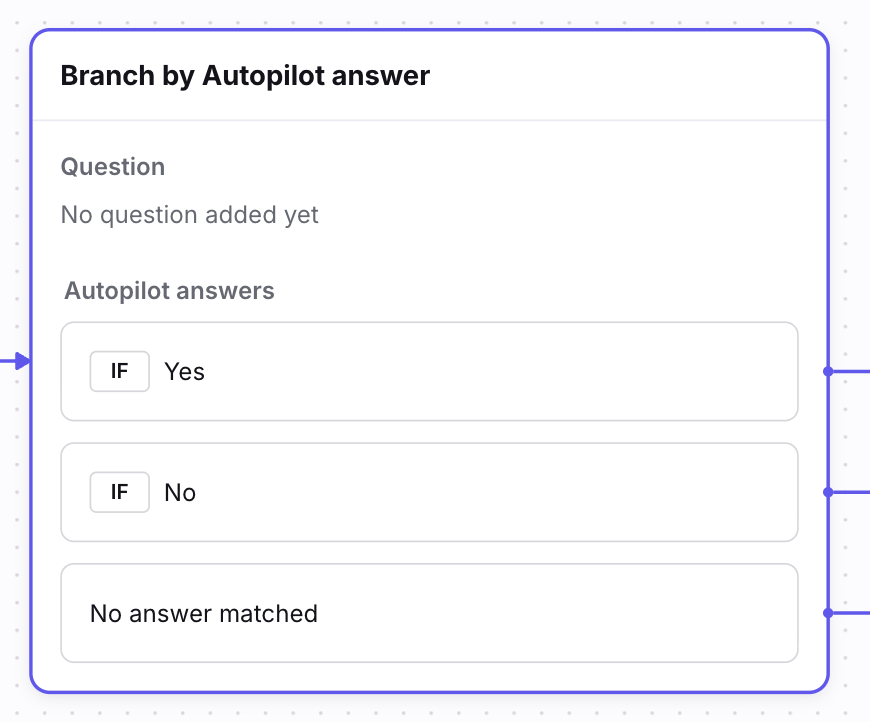
Configuring the step
Question type — Choose between two modes:
Yes or no question — The AI returns Yes or No. Use this for simple gates (e.g., "Does this message express urgency?").
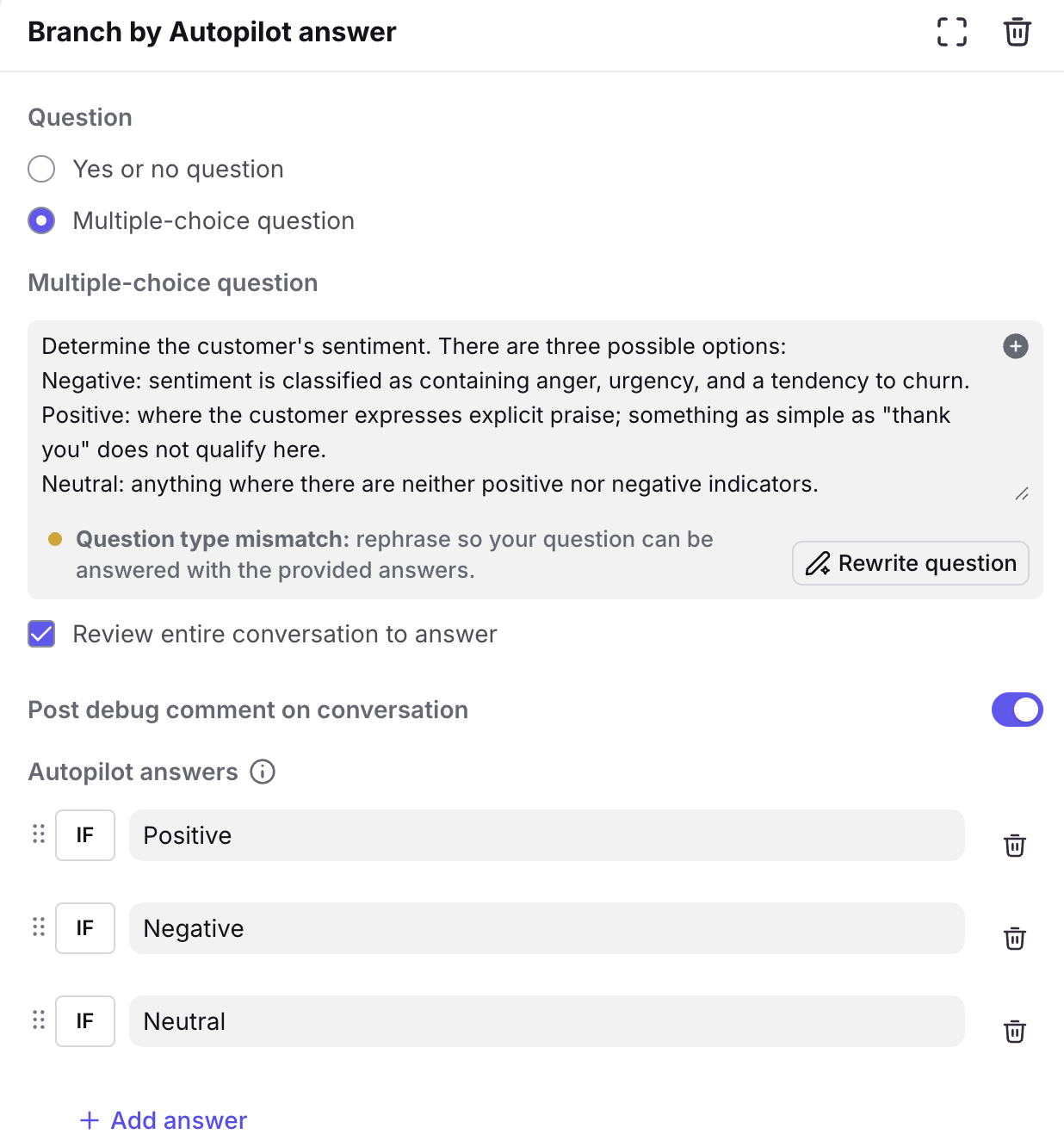
Multiple-choice question — The AI picks from a list of answers you define. Use this for routing into several mutually exclusive categories.
Question field — This is where you write your classification prompt. It's labeled "Ask about the newest message" in the UI, and it's where all of the context, definitions, and tie-breaker rules go. (See Part 3 for templates.)
Review entire conversation to answer — When unchecked (the default), the AI focuses on the most recent inbound message. Check this box if you want the AI to consider the full conversation history. This is a team-by-team decision: some teams find that older messages add noise, while others need the full thread for context (for example, when a customer's initial message contains key details that later replies refer back to). Choose the option that fits your workflow.
Autopilot answers — These are the category values the AI can return. Each answer becomes its own branch in the rule, so you can attach different actions (tag, move, assign, reply) to each one. You can drag to reorder, and click + Add answer to add more.
Example:
"No answer matched" — This is the built-in fallback branch. It fires when the AI can't confidently match any of your defined answers.
Writing your prompt
Every effective classification prompt has four parts:
Context — A short description of what your team does and what kind of messages come in. This helps the AI understand the domain.
Category definitions — A clear, plain-language definition for each category, including the signals that indicate it.
Tie-breaker rules — What should the AI do when a message could fit more than one category?
Rules of thumb for categories
Keep category values short and stable. Values like BILLING, TECH_SUPPORT, and SALES work well. Put the nuance in your prompt, not the labels.
Categories in a single node must be mutually exclusive. Within any one "Branch with Autopilot" step, every answer must be distinct — the AI picks exactly one. If you find that a dimension (like urgency or VIP status) naturally cuts across your primary categories (a message can be both BILLING and urgent), don't force it into the same node. Instead, handle it as a separate classifier step, or a separate rule, that runs before or after your primary classification.
Always include a fallback. Even though the step has a built-in "No answer matched" path, it's often helpful to also define an explicit OTHER or UNKNOWN answer in your list for cases where the AI can make a classification but no specific category fits. This way, No Answer Matched is preserved especially for cases where AI is unsure.
Define what each category is not. Negative guidance ("Do NOT classify as Billing if the message is only asking for a copy of an invoice") is often more helpful than positive guidance alone.
Below is an example of how a multiple-choice Branch with Autopilot node should look when set up correctly:
Part 3: Prompt templates and examples
Template: Single-step categorization (Multiple choice)
This is the most common pattern. Use it to route messages into one of several buckets.
Context:
You are classifying inbound messages for [short description of your team
and what they handle].
Choose the single best category based on the message's primary intent.
Value definitions:
- BILLING:
Invoices, charges, refunds, payments, pricing on an existing account,
or updating billing details.
- TECH_SUPPORT:
Product issue, error, bug, broken workflow, login problem, or
troubleshooting request.
- SALES:
Buying, upgrading, requesting a quote, adding seats, or scheduling
a demo.
- OTHER:
Anything that does not match the definitions above.
Tie-breakers:
1) If multiple categories apply, choose the one that best matches
the primary intent of the message.
2) If still uncertain, choose OTHER.
How to adapt this: Replace the definitions with your own categories and language. Add one or two "close-miss" exclusions for categories that tend to get confused with each other.
Template: Two-step routing (Yes/No gate → Multiple choice)
Use this when one category is especially common or operationally important and you want to catch it first.
Step 1 — Yes/No gate:
Question: Is the most recent inbound message requesting a refund?
Answer "Yes" if the sender is requesting a refund, reimbursement,
disputing a charge, or asking to reverse a payment.
Answer "No" if the sender is only asking for an invoice copy, pricing
information, or payment method updates.
Step 2: If "Yes" → route to your refund workflow. If "No" → pass to a multiple choice classifier for everything else.
This pattern is useful when a single high-volume category (like refund requests or urgent escalations) benefits from its own dedicated path.
Template: Multi-tier classification with priority
Use this when senders may reference multiple categories and you need the AI to pick the highest-priority one.
Context:
You are classifying inbound messages for [your team description]. Senders may
mention multiple categories in one message.
What to consider:
- If a tier is explicitly named, that is the strongest signal.
- If multiple tiers are mentioned, classify based on the highest-priority
tier (ENTERPRISE > MID_MARKET > SMB).
Value definitions:
- SMB:
Small or simple requests. Signals include: "small", "basic", "simple".
If no tier is mentioned, infer SMB when the request is straightforward
with limited scope.
- MID_MARKET:
Medium complexity requests. Signals include: "mid-market", "standard".
Infer when the request involves moderate scope or multiple stakeholders.
- ENTERPRISE:
High complexity or high impact requests. Signals include: "enterprise",
"strategic", "large", "global". Infer when the request involves high
risk, urgency, or complex constraints.
- SPECIAL_CASE:
A distinct class handled separately — partner channel, VIP, legal,
security, or escalation. Signals: "VIP", "legal", "security",
"executive", "partner", "escalation".
- NEEDS_MANUAL_REVIEW:
Insufficient information to determine the best category.
Tie-breakers:
1) If SPECIAL_CASE is clearly indicated, choose SPECIAL_CASE.
2) Otherwise, choose the highest-priority tier mentioned.
3) If still uncertain, choose NEEDS_MANUAL_REVIEW.
Template: Stage-based classification
Use this for teams that wish to flag the specific stage of a request.
Context:
You are classifying inbound messages for [your team description].
Choose the single best category based on the message's primary intent.
Value definitions:
- NEW_QUOTE:
Asking for a price, rate, or quote for something not yet booked.
- PICKUP_REQUEST:
Asking to schedule, arrange, or change a pickup. Often includes
dates, times, addresses, or reference numbers.
- TRACKING:
Asking about status, updates, delivery confirmation, or "where is it?"
- CHANGE_REQUEST:
Asking to change something previously requested or approved.
Signals: "change", "update", "revise", "modify".
- INCIDENT:
Reporting a problem, outage, or issue requiring immediate attention.
Signals: "down", "broken", "error", "help ASAP".
- OTHER:
Does not clearly fit any category or lacks sufficient details.
Tie-breakers:
1) If the message includes both a pickup request and a status question,
choose PICKUP_REQUEST.
2) If ambiguous between CHANGE_REQUEST and a new request, look for
references to prior approvals or order numbers — if present,
choose CHANGE_REQUEST.
3) If still uncertain, choose OTHER.
Part 4: Providing definitions and examples to strengthen your prompt
Strong category definitions are the single biggest factor in classification accuracy. Here's how to build them.
For each category, document:
A plain-language definition — What does this category mean? When should it be used?
Common indicators and signals — What phrases or intent reliably show up in messages that belong to this category?
What should NOT be classified here — Examples of messages that look similar but should go elsewhere.
Below are three worked examples showing how to document categories for different types of teams.
Example 1: Logistics team
Category | Definition | Common keywords | What should NOT be classified here |
Accident | The vehicle or driver was involved in an accident while en route or during pickup/delivery. | incident, accident, damage, police, injury, tow | A traffic slowdown caused by an unrelated accident on the route. Also, if the load hasn't been picked up and the sender references an accident as a reason they can't pick up — classify that as Recovery instead. |
Breakdown | A mechanical problem or equipment failure with the vehicle assigned to the job. | breakdown, mechanical issue, mechanic, roadside, repair, in the shop | If the vehicle breaks down before pickup and the sender asks to be removed from the job, classify as Recovery. |
Recovery | The sender asks to be removed from the job, or requests cancellation. Reasons may include lack of capacity, driver illness, or delays. | recover, unable to service, no capacity, cancel, take us off | If the driver already picked up and then an accident or breakdown happens in transit, classify as Accident or Breakdown — not Recovery. |
Why this works: The boundaries between Accident, Breakdown, and Recovery hinge on when the event happens (before pickup vs. in transit) and what the sender is asking for (reporting an incident vs. requesting removal). The "what should NOT be classified here" column captures these distinctions explicitly.
Example 2: SaaS support team
Category | Definition | Common keywords | What should NOT be classified here |
Bug Report | The customer is reporting something that isn't working as expected — an error, broken feature, or unexpected behavior in the product. | bug, error, broken, not working, crash, glitch, issue, can't load, 500 error, won't save | A customer asking how to use a feature that is working correctly — classify that as How-To instead. Also, a customer requesting a feature that doesn't exist yet is a Feature Request, not a Bug Report. |
How-To | The customer is asking for help using an existing feature — setup guidance, configuration questions, or "how do I do X?" | how to, how do I, set up, configure, walkthrough, steps, getting started, where do I find | If the customer is describing something that should work but doesn't, classify as Bug Report. If they're asking about a feature that doesn't exist, classify as Feature Request. |
Feature Request | The customer is asking for a new capability, enhancement, or integration that doesn't currently exist in the product. | would be great if, feature request, can you add, wish list, suggestion, roadmap, any plans to | If they're describing a feature that exists but is broken, classify as Bug Report. |
Billing | The customer has a question about their invoice, subscription, plan changes, charges, or payment method. | invoice, charge, subscription, upgrade, downgrade, payment, refund, receipt, prorate | A customer asking about pricing for a plan they haven't purchased yet — that's a Sales inquiry if you have a Sales category, or How-To if it's about understanding plan differences. |
Account Access | The customer can't log in, needs a password reset, is locked out, or has questions about user permissions and roles. | can't log in, locked out, password reset, access denied, permissions, SSO, MFA, invite | The customer cannot access their account due to Billing reasons, and mentions invoices or payment alerts that preceded the issue. |
OTHER | The message doesn't clearly fit any of the above categories. | — | — |
Why this works: SaaS support teams often see messages that blur the line between "I don't know how to do this" (How-To) and "this is broken" (Bug Report). The negative guidance draws that line explicitly: if the feature works but the customer needs help, it's How-To; if the feature doesn't work as expected, it's a Bug Report.
Example 3: General sentiment classification
Sentiment is a good example of a cross-cutting dimension — a message can be about billing and have a negative tone. For that reason, sentiment is best handled as its own separate rule, rather than mixed into a topic-based classification.
Category | Definition | Common keywords | What should NOT be classified here |
Positive | The customer expresses satisfaction, gratitude, or praise. The overall tone is happy or appreciative. | great, love it, amazing, awesome, well done, impressed, happy with | A message that is polite but is actually making a complaint or reporting an issue — politeness alone doesn't make it Positive. Classify based on the underlying intent. Messages that show brief gratitude (“thanks for sending this”) but don’t express explicit praise. |
Negative | The customer expresses frustration, dissatisfaction, or anger. The overall tone is unhappy or critical. | frustrated, disappointed, unacceptable, terrible, worst, unhappy, fed up, waste of time | A customer reporting a bug or negative experience without emotional language — that's Neutral, not Negative. |
Neutral | The customer is asking a straightforward question or providing information without strong positive or negative emotion. | — | Messages that contain urgency with any amount of negative emotional sentiment or impatience should be classified as Negative, not Neutral. |
Escalation Risk | The customer signals they may escalate — mentioning cancellation, switching to a competitor, involving leadership, or threatening public complaints. | cancel, switching to, competitor, manager, legal, social media | A customer mentioning a competitor in passing ("I used to use X") without any threat or dissatisfaction — classify as Neutral or Positive depending on tone. |
Why this works: Sentiment classification runs on a different axis than topic classification. You'd typically set this up as a separate "Branch with Autopilot" rule so you can both route by topic (Billing, Bug Report, etc.) and flag by sentiment (Negative, Escalation Risk) without forcing one dimension to compete with the other.
Part 5: Putting it all together — a complete workflow
Here's how a typical workflow looks when you combine deterministic rules with AI classification:
Step 1: Deterministic rules fire first
Set up linear rules at the top of your rule list to catch the obvious cases before AI is needed:
System notifications → Auto-archive or route to a dedicated inbox
Known escalation addresses → Route directly to the escalation queue
Internal distribution lists → Tag as "FYI" and archive
Step 2: AI classification handles everything else
Create a branching rule triggered on new inbound messages in your inbox. Add a Branch with Autopilot step with your classification prompt. Each branch maps to a category value and takes the appropriate action (tag, move, assign, or reply).
📖 Learn more: Understanding rule ordering
Part 6: Testing and iterating on your prompts
Getting your prompt to classify accurately is an iterative process. Here's a practical approach:
Before you launch
Gather 10+ real messages per category. These become your test set. For each message, write down which category it should be and why.
Include close-miss examples. Collect 5–10 messages that are tricky — they look similar across categories but should route differently. These are the highest-leverage examples for improving your prompt.
Run your prompt against the test set. Note which messages are classified correctly and which aren't.
To test these conversations, use the Test feature at the bottom of the rule builder:
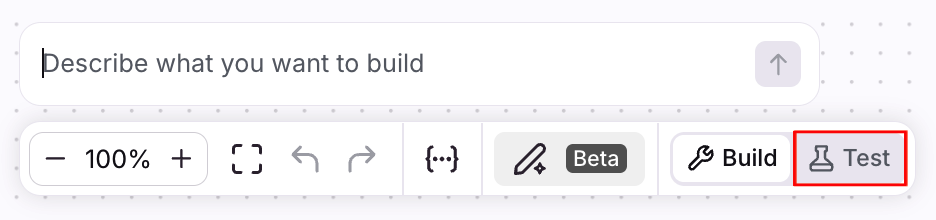
📖 Learn more: Test conversations in your rules
When something is misclassified
Identify the pattern — are multiple failures caused by the same issue?
Update your prompt to address only that issue. Change one thing at a time: a definition, a tie-breaker, or a scope instruction.
Re-run your test set to make sure you haven't broken something that was previously working.
Track your results
Keep a simple spreadsheet with columns for: message ID, expected category, actual category, prompt version, pass/fail, and a short note on what went wrong. This makes it easy to measure progress and catch regressions.
When to launch
Your prompt is hitting an accuracy level you're comfortable with across all categories.
You've tested against real messages, not just ideal examples.
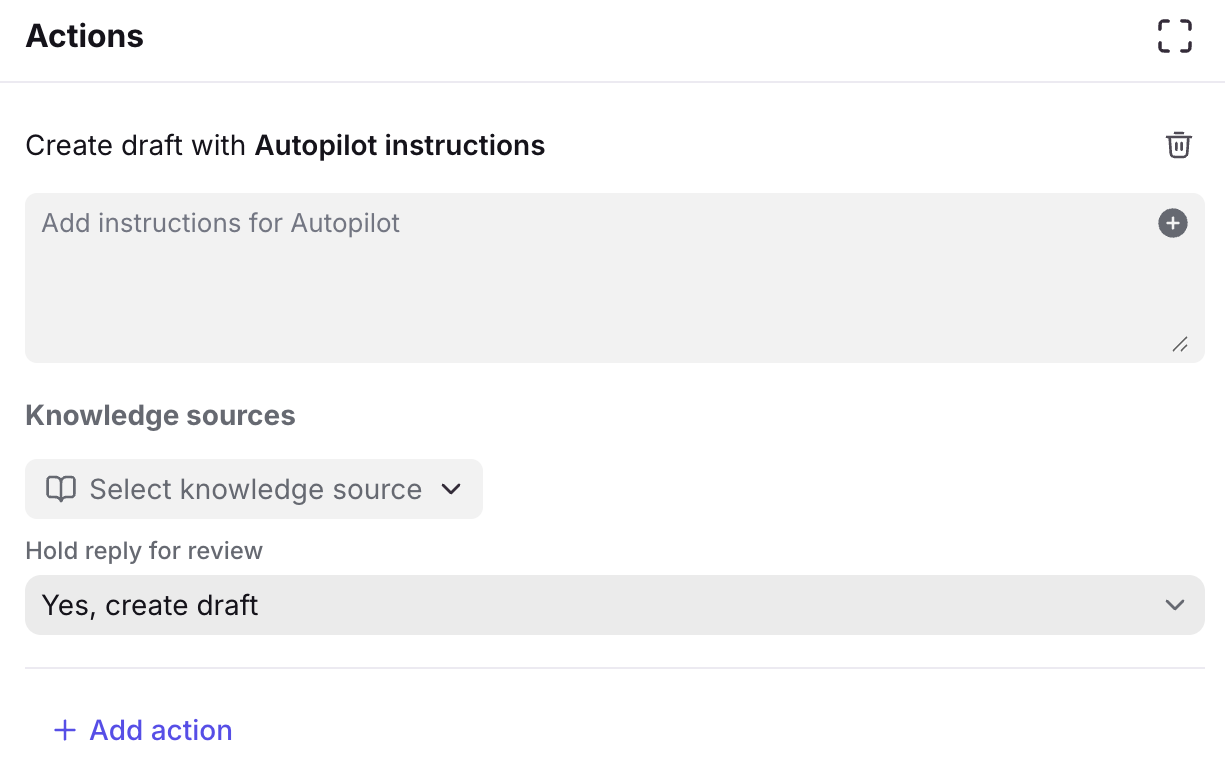
Tip: If you have a reply step enabled as an action, start out by holding these replies in draft mode. Review these drafts before enabling auto-sending, so you can catch issues before they affect your team's workflow:
Quick reference: Before-you-ship checklist
[ ] Categories within each step are mutually exclusive
[ ] Cross-cutting dimensions (urgency, sentiment) are handled as separate steps
[ ] Every category has a clear, plain-language definition
[ ] Your prompt includes a scope instruction (what to focus on and include)
[ ] Tie-breaker rules exist for ambiguous cases
[ ] You have at least 10 real examples per category for testing
[ ] Deterministic rules are ordered above AI rules in your rule list
[ ] You've tested against real messages and tracked accuracy