
Attachment / file limit size
Overview
When sending messages, Front’s attachment size limits vary based on the channel type you’re using.
Size limits
Front's attachment size limits:
Gmail: 25 MB per message
Office 365*: 100 MB per message
Generic SMTP (Sendgrid): 19.5 MB per message
Custom SMTP: 25 MB per message. Attachments can be image files, PDFs, and documents.
Autopilot Resolve, Front Chat: 25 MB per message
X (previously Twitter): 5 MB per message
Discussions, tasks, and comments: 100 MB per comment
All other channel types: 25 MB per message
*The attachment size limit is determined at the time of creation for an Office 365 channel. If a channel is switched over to Office 365, the attachment size limit may not be updated.
Attachment limits
Front has a maximum attachment limit of 100 files per email.
Troubleshooting
Why do I see an attachment limit warning without adding any new attachments?
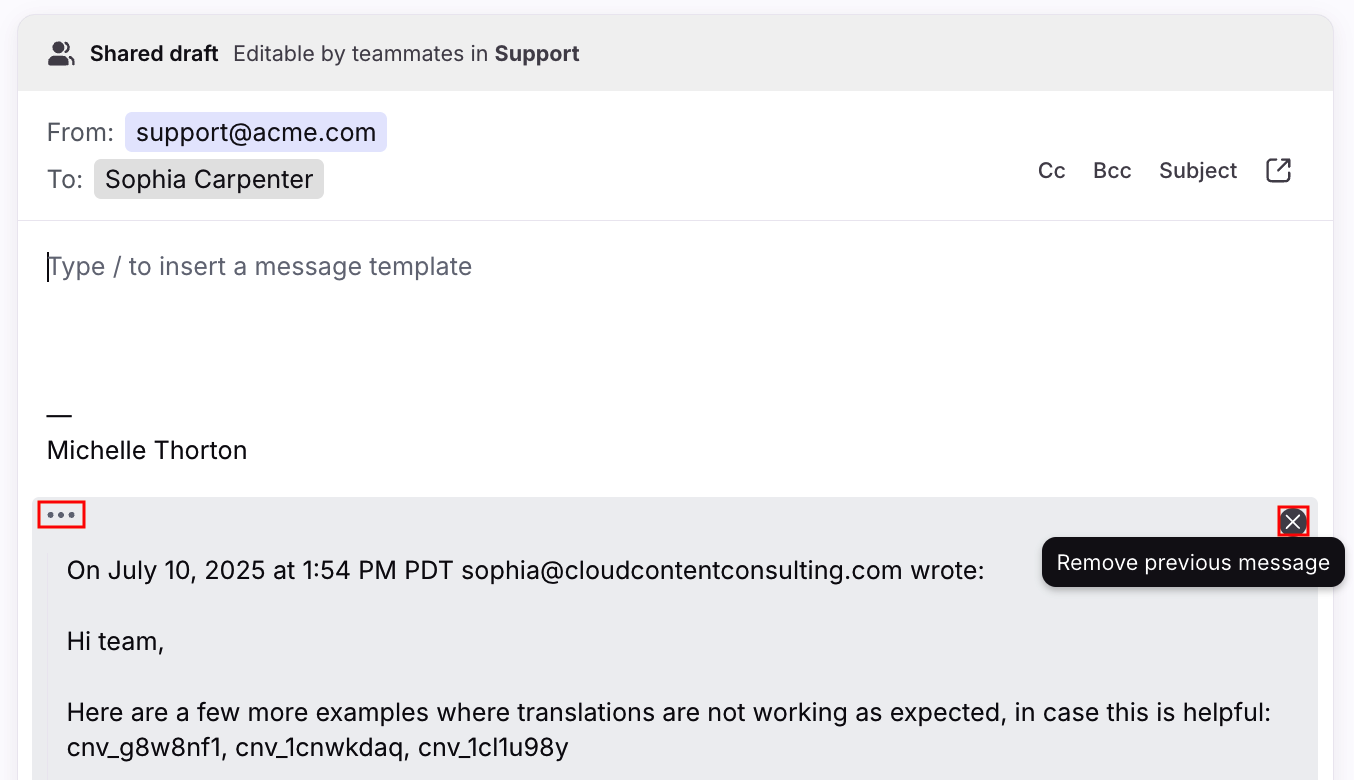
This commonly happens when replying to a long email thread. Each reply can carry forward every attachment and inline image from the messages quoted underneath it —including logos, banners, or award graphics embedded in your own or a recipient's email signature. Over enough back-and-forth replies, those repeating signature images can push a message past the 100-file limit, even though you haven't attached anything new.
To work around the error, click the three-dot icon in the bottom-left corner of your message in the composer to view the previous messages, then the X icon on the right to remove the previous messages from your reply.
How do I send files larger than the limit?
If a file is too large to attach directly, use a cloud storage integration such as Google Drive to share a link instead of an inline attachment.