
Understanding round robin, load balancing, and least recently assigned
Overview
When managing incoming conversations, it’s important to choose the right assignment method to ensure your team handles customer inquiries efficiently. Front offers three methods: round robin, load balancing, and least recently assigned. All three automate the assignment process, but they differ in how they pick the next teammate and whether they respect assignment limits.
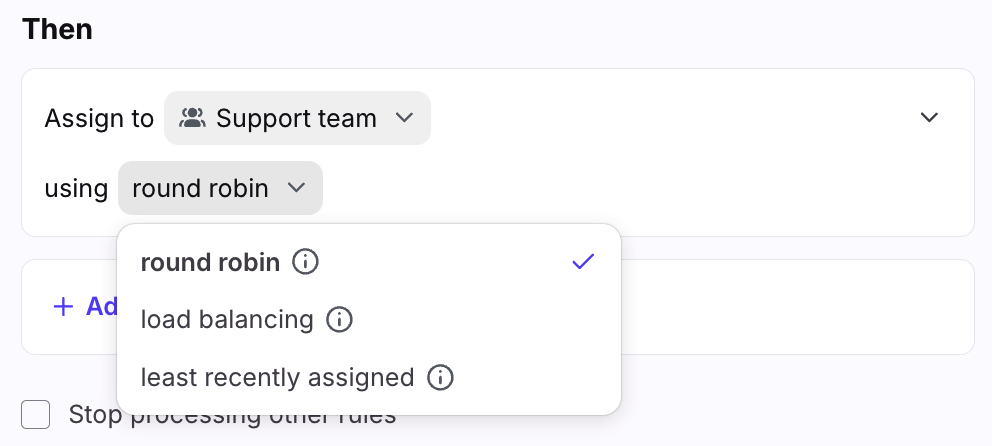
Round robin assignment
Round robin automatically assigns incoming messages to available team members in a sequential order. This method ensures an even distribution of workload among the team by cycling through members one by one.
Key points
Automation: Round robin automatically assigns conversations to online team members.
Online status dependency: If all teammates are offline, the system won’t assign the conversation. There is no queue to hold the message for later assignment.
Missed assignments: If a teammate becomes available after an assignment was missed due to their offline status, the conversation won’t be reassigned automatically. The assignment will only happen when the teammate is online at the time the conversation comes in.
Assignment behavior when a teammate appears in multiple selected teammate groups: We start by gathering all selected teammates and any groups included in the Assign actions. For each group, we expand it to list out the individual teammates. Then, we combine everything into a single list and remove any duplicates so that each teammate appears only once. Once the list is finalized, we apply the round robin assignment.
When to use round robin
Round robin is ideal for teams where an even distribution of work is needed, and there’s always someone available to handle incoming conversations.
See this article for an example rule build.
Load balancing assignment
Load balancing, on the other hand, automatically assigns conversations based on availability, ensuring that conversations are queued and distributed as teammates come online. This method is particularly useful for managing varying workloads and ensuring no conversations are left unassigned.
Key points
Automation with queuing: Conversations are automatically queued and assigned to the next available online teammate.
Ensuring assignments: Unlike round robin, load balancing ensures that no conversation is missed. The system will hold the message in a queue until a teammate becomes available, then automatically assign it.
Efficient workload management: Load balancing can be especially effective for teams that experience fluctuating availability or varying workloads throughout the day.
When to use load balancing
Load balancing is ideal for teams that need to manage workload effectively and ensure all conversations are handled, even if no one is initially available.
See this article to learn more about load balancing.
Least recently assigned assignment
Least recently assigned routes each new conversation to the teammate whose last assignment from this rule was the oldest, as long as they're under their assignment limit. It combines the rotation of round robin with the assignment limits and queue of load balancing.
Key points
Rotation by rule: Each rule keeps its own order. In a branching rule, each branch keeps its own order. Conversations assigned by other rules or by teammates don't change it.
Assignment limits: The rule uses the same assignment limits as load balancing. A teammate at their limit is skipped and keeps their place: they receive the next conversation once they're under their limit again.
Queuing: If every teammate is at their limit, Out of office or Busy, conversations wait in a queue and are assigned as soon as a teammate has bandwidth, like load balancing.
Starting order: Teammates this rule hasn't assigned to yet go first, in the order they're listed in the Assign to teammates action. This includes teammates you add to the rule later.
Workload isn't compared: The rule checks each teammate's limit, not how many open conversations they hold. A teammate busy with long conversations still receives the next one while they're under their limit.
When to use least recently assigned
Least recently assigned is ideal when each teammate should receive about the same number of conversations over time. For example, a sales team might use it to distribute leads when each teammate’s share affects their targets.
Examples
Round robin assignment example
Imagine a team of four: Leonardo, Raphael, Michelangelo, and Donatello. The round robin assignment works as follows:
When a new message comes in:
Leonardo, Raphael, Michelangelo are currently online, Donatello is offline.
The first incoming conversation will be assigned to Leonardo. The next incoming conversation will be assigned to Raphael. The third conversation will be assigned to Michelangelo.
If a fourth message comes in while Donatello is still offline, it will skip him and loop back to Leonardo.
If Donatello comes online later, they won’t be retroactively assigned any conversations that were skipped; the cycle will continue as normal from the point of the last assignment.
Load balancing assignment example
Imagine a team of three: Alvin, Simon, and Theodore. They all have an assignment limit of 1 conversation each. The load balancing assignment works as follows:
A new message comes in:
Alvin and Simon are currently online, while Theodore is offline.
The first incoming conversation is assigned to Alvin.
If Simon goes offline after Alvin is assigned a message, and a second message arrives, the system will queue this conversation.
When Theodore comes online, the queued message will automatically be assigned to him.
If more messages come in while all teammates are offline, each message will be queued. As soon as a teammate comes online, the oldest unreplied conversation is assigned first, ensuring no conversation is missed.
Least recently assigned example
Imagine a team of three: Ana, Ben, and Chloe, listed in that order in the rule. They all have an assignment limit of 2 conversations.
The first three conversations go to Ana, Ben, and Chloe, in the order they're listed.
Ana resolves her conversation right away. The fourth conversation goes to Ana, since this rule assigned to her longest ago.
Ana resolves that one too. When the fifth conversation comes in, Ana holds no open conversations, but it goes to Ben, since this rule assigned to him longest ago.
A teammate manually assigns Chloe another conversation, which puts her at her limit of 2. When the sixth conversation comes in, Chloe is next in line, but she's skipped as she's at her limit, and the conversation goes to Ana. Chloe keeps her place and receives the next conversation once she's under her limit again.
If Ana and Ben also reach their limit, new conversations wait in the queue and are assigned as soon as one of them is under their assignment limit.
Choosing the right method
Each method fits a different need:
Round robin: your team is always available and you want an even rotation, with no limits.
Load balancing: you want to balance how many conversations each teammate is handling at any given moment, so no one is overwhelmed and no conversation is missed. This fits most support teams.
Least recently assigned: you want each teammate to receive about the same number of conversations over time, within their assignment limits, with no conversation missed.
By understanding these differences, you can better configure your conversation assignments to optimize your team’s efficiency and ensure customer inquiries are handled promptly.
FAQ
Why does Test rule always show the first teammate?
The Test rule feature doesn't read the rule's assignment history. For least recently assigned, it shows the first available teammate in the order they're listed in the rule. Live assignments follow the rotation.
Does the least recently assigned rotation ever start over?
Yes. If a rule doesn't assign any conversation for 30 days, the least recently assigned rotation starts over from the order teammates are listed in the rule.
Pricing
Load balancing and least recently assigned are available on the Professional plan or above. Some legacy plans may also have these features.